How to Choose the Best Graduation Photo for Custom Art

The best graduation photograph for custom layered art is not always the official stage image.
It is also not automatically the most formal senior portrait or the file with the largest pixel dimensions.
The strongest source combines two things:
- It means something to the graduate or family.
- It contains enough real visual information to become strong layered art.
A professionally photographed image may still be difficult when the graduate is tiny, the face is blocked, the gown disappears into a dark stage, or the only available file is a compressed preview.
A family phone photograph may work very well when the graduate is close, clearly lit, and recognizable.
WTx3D reviews the actual source before production and may prepare the background, crop, brightness, whites, darks, contrast, sharpness, and color direction for that specific photograph.
The customer does not need to judge the image alone. Comparing a small number of candidates first can still make the review faster and the final result stronger.
Explore Graduation Custom Photo Art.
The strongest source balances meaning and usable information
Think of graduation-photo selection as two separate questions.
How meaningful is the image?
Ask:
- Does this photograph feel like the graduate?
- Is it the image the graduate or family returns to?
- Does it show the real achievement?
- Does it preserve the cap, gown, uniform, activity, family, or place that matters?
- Is it connected to a specific story?
- Would a technically clearer photograph feel less personal?
- Is the ceremony moment more important than a posed image?
- Does the image represent the next step, not only the event?
Meaning matters because the artwork is intended to represent an actual person and milestone, not a generic graduate.
How much usable information is present?
Ask:
- Is the face large enough?
- Are the eyes and expression visible when possible?
- Is the cap or headwear preserved?
- Are the gown, hood, cords, stole, medals, uniform, or other important details visible?
- Is the subject in focus?
- Is the lighting manageable?
- Is the graduate heavily blocked?
- Does the background merge with the subject?
- Is there room for crop adjustments?
- Is the source an original file or a compressed copy?
- Does the customer have permission to reproduce it?
The best candidate performs well in both areas.
A meaningful image with limitations may still deserve review. A clear image with less emotional value may become a backup or another position in a four-photo set.

Begin with several candidates, not one rushed choice
Collect a small group of likely photographs.
Useful candidates may include:
- Favorite senior portrait
- Cap-and-gown portrait
- Full-body graduation image
- Graduate holding the diploma
- Ceremony or stage moment
- Graduate with family
- Graduate with mentor, teacher, coach, spouse, or another important person
- Campus or training-location photograph
- Activity or uniform image
- Military graduation image
- Earlier school or childhood image
- Profession or next-step image
Do not send a large unorganized gallery and expect WTx3D to guess which details matter.
Instead, identify:
- First-choice anchor portrait
- Strongest technical backup
- Most meaningful ceremony image
- Best family or relationship image
- Best school, service, place, or next-step image
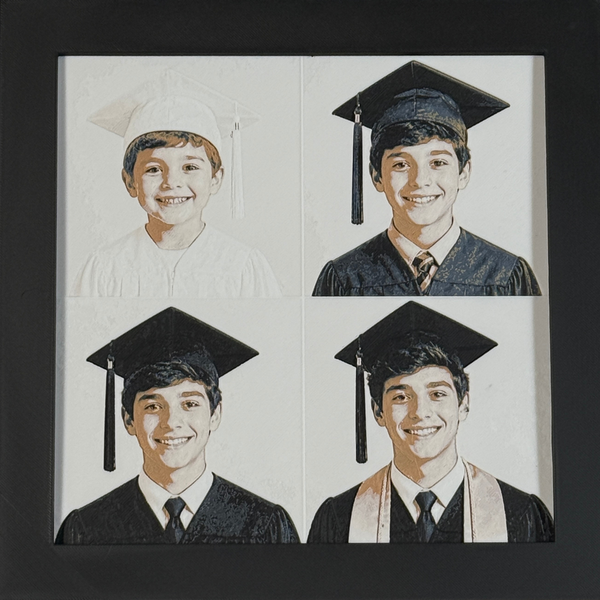
A short note explaining why each candidate matters can help WTx3D understand the customer’s priorities. When four different parts of the achievement matter, use the Graduation 4-Pack Guide to organize them without forcing one photograph to do every job.
Subject size matters more than total file size
A large file can still contain a very small graduate.
A wide ceremony photograph may contain many pixels while the graduate occupies only a small part of the stage.
Look at the graduate, not only the image dimensions.
Ask whether the photograph clearly shows:
- Face
- Eyes and expression
- Hair
- Cap
- Tassel
- Hood
- Stole
- Cords
- Medals
- Uniform
- Diploma or certificate
- Body outline when important
- Activity or instrument
- Relationship with another person
A closer source usually preserves more identity.
A wide photograph may still be valuable when the ceremony, campus, formation, venue, or group is central. It may work better as one position in a Custom Photo 4-Pack beside a closer anchor portrait.
Choose the view based on what matters
Close portrait
A close portrait is usually strongest when:
- Facial identity matters most
- Expression is the center
- Hair, makeup, cap, or headwear detail matters
- The graduate should remain the sole focus
- The background is secondary
This view provides less room for full gown, uniform, diploma, or setting.
Half-length portrait
A half-length image often balances:
- Face
- Cap and tassel
- Gown
- Stole
- Cords
- Diploma
- Hands
- Uniform detail
- Useful body language
It is one of the strongest general-purpose graduation formats.
Full-body photograph
A full-body image may work when:
- Complete gown or uniform matters
- Footwear or stance is meaningful
- The graduate is posed at a campus location
- A sport, activity, instrument, or profession is part of the story
- The subject still occupies enough of the image
The farther the person is from the camera, the less room remains for facial detail.
Stage or ceremony photograph
A stage image may preserve:
- Diploma presentation
- Hooding
- Pinning
- Commissioning
- Oath
- Handshake
- Award
- Actual completion moment
It may also include:
- Distance
- Motion blur
- Bright spotlight
- Dark background
- Another person
- Microphone
- Podium
- Projected screen
- Small face
Use the stage image when the moment matters, but do not force it to carry the face, regalia, and entire story alone.
A 4-Pack can pair it with a clearer portrait.
Graduate with family or another person
A relationship image may be strongest when the support around the graduate is the main story.
It works best when:
- Graduate remains easy to identify
- Important people are close
- Faces are visible
- Lighting is reasonably consistent
- No one is heavily blocked
- The group is not too large
One clear portrait and one separate family image may preserve more detail than one crowded photograph.
Face, cap, and headroom
The top of the graduation cap is easy to crop unintentionally.
A useful source leaves enough room around:
- Cap
- Tassel
- Hair
- Head
- Shoulders
- Hood or stole
- Uniform cover or other headwear
A tightly cropped cap cannot always be rebuilt accurately.
Do not pre-crop the image aggressively when the original file is available.
The same rule applies to military covers, ceremonial headwear, hairstyles, and cultural or religious attire.
Cap, gown, cords, hood, diploma, and uniform details
Tell WTx3D which details matter most.
Possible important elements include:
- Cap
- Tassel position or color
- Gown
- Academic hood
- Stole
- Sash
- Honor cords
- Medals
- Pins
- Diploma
- Certificate
- Letterman jacket
- Sport uniform
- Band or performance uniform
- Military uniform
- Rank
- Ribbon or patch
- Instrument
- Project or tool
- Another verified detail
The source must show those elements clearly enough.
Very small:
- Diploma wording
- Seal
- Embroidery
- Medal inscription
- Name tape
- Rank detail
- Logo
- Patch
- Pin
- Tassel charm
may need simplification.
A larger presentation may provide more room, but it cannot create information absent from the source.
Lighting can hide or preserve the details
Dark gown on a dark stage
A black or dark gown may merge with:
- Curtain
- Auditorium
- Hair
- Dark wall
- Another person’s clothing
- Night background
Useful source information includes:
- Shoulder outline
- Sleeve edges
- Hood or stole contrast
- Cord visibility
- Face and hair separation
- Cap outline
- Hands and diploma
WTx3D may adjust tonal separation, dark levels, contrast, highlights, background, and color direction.
A completely featureless dark area cannot be reconstructed with guaranteed accuracy.
Bright outdoor ceremony
Outdoor light may create:
- Strong facial shadow
- Squinting
- Blown highlights
- White sky
- Bright gown
- Deep shade under the cap
- High contrast between face and clothing
Useful information must remain around the eyes, face, gown, and headwear.
WTx3D may adjust highlights, shadows, contrast, crop, and background treatment where real detail remains.
White or light gowns
A light gown may disappear against:
- Bright wall
- Sky
- Stage
- Sunlit background
- Light clothing
Visible folds, shadow, edge, and contrast help preserve the garment.
Colored stage lighting
Red, blue, purple, or mixed stage lights can affect:
- Skin tone
- Gown color
- School colors
- Background
- Face visibility
WTx3D may adjust color direction, but exact natural-color recovery cannot be guaranteed when the source is heavily color-cast.
Focus and motion blur
Not every soft graduation image is unusable.
A mildly soft photograph may still preserve:
- Face
- Eyes
- Expression
- Cap
- Gown
- Uniform
- Diploma
- Pose
- Relationship
A severely motion-blurred image may replace real facial information with streaks or overlapping shapes.
WTx3D may improve perceived sharpness when genuine edges remain.
WTx3D cannot promise:
- Exact reconstruction of invisible eyes
- Natural rebuilding of a blurred face
- Recovery of unreadable diploma text
- Accurate uniform details that are not visible
- Perfect restoration of a moving stage image
When several frames from the same moment exist, choose the one with the clearest face and body position.
Background separation
A busy or similar-colored background can make the graduate harder to prepare.
Common issues include:
- Dark gown on dark curtain
- White gown on pale wall
- Hair merging into background
- Crowd behind the graduate
- Projected screen
- Campus signs crossing the head
- Vehicles
- Furniture
- Stage equipment
- Other graduates
- Flags or decorations crossing the body
WTx3D normally removes or simplifies the background when that creates a stronger layered result.
A clean source helps, but a blank studio wall is not required.
Background cleanup does not include unlimited reconstruction of hidden body parts or a completely new ceremony scene.
Leave room for the crop
A source is easier to work with when it includes some space around:
- Cap or headwear
- Hair
- Shoulders
- Stole
- Hood
- Cords
- Diploma
- Hands
- Instrument
- Uniform
- Another person when the relationship is important
- Campus or school feature when the place matters
Avoid aggressive pre-cropping.
The original file gives WTx3D more flexibility to center the graduate and preserve the details the customer values.

Use the original file whenever possible
The original phone, camera, scan, or authorized photographer file normally contains more genuine detail than:
- Screenshot
- Social-media download
- Message preview
- Yearbook screenshot
- Livestream frame
- Heavily filtered copy
- Repeatedly saved image
- Watermarked preview
Compression may reduce information around:
- Eyes
- Hair
- Cap
- Tassel
- Cords
- Hood
- Medal
- Diploma
- Uniform
- Family faces
- Campus details
A screenshot may still be reviewed when it is the only source, but it should not be treated as equal to the original automatically.
When an enhanced version exists, send both the original and edited file.
WTx3D can determine which source produces the stronger and more faithful result.
Professional-image permission
Professional senior portraits, school photography, ceremony images, event photography, military photographs, sports images, and other third-party files may remain protected.
The customer should upload only photographs they own or have permission to reproduce.
Do not assume that any of the following automatically grants reproduction rights:
- Appearing in the photograph
- Buying a print
- Accessing a gallery
- Receiving a yearbook image
- Downloading a preview
- Posting the image on social media
- Possessing a watermarked file
- Finding the image on a school, military, or organization page
When permission is unclear, contact the photographer, rights holder, or WTx3D before ordering.
One graduate usually allows the most detail
One clear graduate usually gives the artwork the greatest room for:
- Face
- Expression
- Cap
- Regalia
- Uniform
- Diploma
- Honors
- Activity or profession
Several people may work when:
- They are already together
- Faces remain large enough
- Lighting is consistent
- No one is heavily blocked
- The group is not overcrowded
When the graduate and family each deserve clear identity, a Custom Photo 4-Pack may be stronger.
WTx3D does not automatically create a new natural group portrait from unrelated source files.
Military graduation photographs
Military or technical-training sources may include:
- Uniform portrait
- Commissioning
- Oath
- Pinning
- School completion
- Formation
- Family
- Flag
- Training location
- Another service image
Look for:
- Face
- Cover or headwear
- Uniform outline
- Rank or important detail when visible
- Useful lighting
- Clear subject size
- Limited obstruction
Tiny uniform elements may need simplification.
Protected insignia, school marks, badges, seals, and unit logos require review.
The customer should verify every service detail in the proof.
Favorite photo versus technically strongest photo
Sometimes the favorite image is not the clearest source.
Do not automatically discard it.
Use three possible routes.
Route 1: use the favorite photograph
Choose it when the limitations are manageable and the emotional value clearly outweighs another source.
Route 2: use the technically stronger photograph
Choose it when the favorite image lacks enough real information to preserve the graduate’s identity or important details.
Route 3: use both in a four-photo story
Use the clearer portrait as the anchor and the favorite stage, family, activity, or campus photograph as another position.
This often creates a stronger and more honest graduation display than forcing one image to do every job.
A practical six-step photo-selection process
Step 1: gather a small set of candidates
Choose several meaningful and technically different images rather than one rushed selection.
Step 2: identify the anchor portrait
Find the photograph with the clearest face and strongest recognition.
Step 3: identify the achievement image
Choose the ceremony, diploma, hooding, pinning, award, or completion moment.
Step 4: identify the relationship or place image
Choose family, mentor, campus, school, service, activity, or next step.
Step 5: compare original files and permissions
Use the strongest authorized version of each image.
Step 6: choose the product structure
Choose one portrait when one image clearly says everything.
Choose a Custom Photo 4-Pack when the anchor portrait, achievement, people, and place or next step each deserve separate visual space.
Read the four-photo guide: Graduation 4-Pack Guide: Four Images That Tell the Achievement Story.
When to contact WTx3D before ordering
Direct review is especially important when:
- Graduate’s face is severely blurred
- Subject is extremely small
- Cap or important details are cropped
- Another person or object blocks the face
- Image is heavily dark or overexposed
- Only a screenshot remains
- Source is a damaged physical print
- Several unrelated photographs must be combined
- School or military marks are involved
- More than four images are essential
- A future ceremony image is not yet available
- A specialty layout or frame is requested
- The artwork must be presented on a fixed date
- Image ownership or photographer permission is unclear
WTx3D should review uncertainty rather than promise the wrong result.
The proof is part of choosing the final image
WTx3D prepares the accepted source and provides a digital proof.
The proof lets the customer review:
- Crop
- Face and expression
- Cap and tassel
- Gown, hood, cords, stole, medal, or uniform
- Diploma or certificate
- Background
- Color direction
- School or service detail
- Text
- Frame path
- Overall presentation
A Custom Photo 4-Pack is shown as one complete proof.
Up to two reasonable proof revisions are included.
A completely different photograph, major reconstruction, protected-design change, or new composite may require separate review.
Nothing enters production until the final proof is approved.
If the proof still does not create a strong result, another source is better than forcing a weak design into production.

Best-graduation-photo checklist
Before uploading, confirm:
- The photograph feels like the graduate
- The face is large enough
- Eyes and expression are visible when possible
- Cap and headwear are not unintentionally cropped
- Important gown, hood, cords, stole, medal, uniform, diploma, or activity details are visible
- Lighting preserves useful information
- Background does not completely merge with the graduate
- There is room for crop adjustments
- The original file is available
- The customer owns the image or has permission to use it
- School or military marks are identified for review
- The favorite image and strongest technical image have both been considered
- One portrait or four-photo structure has been chosen intentionally
- The correct image, size, frame, and other options appear in the cart
- A difficult source or fixed presentation date has been routed for review
Choose the image that preserves identity and meaning
The best graduation source is not defined by one technical rule.
It is the photograph that still feels like the graduate and contains enough genuine information to create strong layered art.
Start with several candidates.
Find the clearest anchor portrait.
Keep the meaningful ceremony, relationship, school, service, or next-step image.
Use the original authorized files.
Then let WTx3D show the planned result before fabrication begins.
Upload the Strongest Graduation Photo for Custom Art
For a severely blurred image, tiny stage subject, professional-photo permission question, school or military mark, several people, separate-photo composite, future ceremony image, more than four essential photographs, or fixed presentation date, use the WTx3D contact page before ordering.
Shopping for a specific kind of graduate? See the High School, College, or Military Graduation Gift guides.
Frequently Asked Questions
What is the best graduation photo for Custom Photo Art?
The strongest source combines emotional meaning with enough visible detail. A clear face, useful subject size, visible cap or regalia, manageable lighting, crop space, and background separation usually help.
Does the graduate need to wear a cap and gown?
No. A senior portrait, uniform, activity image, family photograph, military portrait, or another image connected to the achievement may work.
Is a close portrait better than a full-body graduation photo?
A close portrait usually preserves more facial detail. A full-body image may be stronger when the complete gown, uniform, stance, activity, or location is essential.
Can a stage photograph work?
Possibly. Stage images are often distant or affected by motion blur and difficult lighting. A clearer portrait may serve as the anchor while the stage photograph becomes another 4-Pack position.
How much room should be above the graduation cap?
Leave enough headroom so the cap, tassel, hair, and head are not unintentionally cut off during preparation.
Can cords, stoles, hoods, medals, and diploma details remain?
They may remain when the source shows them clearly and the selected format gives them enough room. Tiny text, seals, embroidery, and inscriptions may need simplification.
Can dark gowns or bright outdoor photos work?
They may work when enough real facial and clothing information remains. WTx3D may adjust brightness, whites, darks, contrast, separation, background, and color direction.
Can a blurry graduation photo be sharpened?
Mild softness may improve when genuine edges remain. Severe motion blur or missing facial information cannot be reconstructed with guaranteed accuracy.
Should I upload the original or a screenshot?
Use the original authorized file whenever possible. Screenshots and compressed copies may contain less genuine facial, tassel, cord, gown, and background detail.
Can I send several possible photographs?
Yes. Identify the first-choice anchor portrait, strongest technical backup, achievement image, and relationship or place image rather than sending a large unorganized gallery.
Can a family photograph be used?
Yes. It works best when the graduate and important people remain large enough and are not heavily blocked. A 4-Pack may preserve more identity when several people matter.
Can a military graduation photograph be used?
Yes, when authorized and clear enough. Protected insignia, school marks, badges, seals, and unit logos require review.
What if my favorite photo is not the clearest image?
The favorite photograph may still be reviewed. It can also become a ceremony, relationship, or place image in a four-photo set while a clearer portrait serves as the anchor.
What happens after I choose the image?
WTx3D reviews and prepares the source, creates a digital proof, and waits for approval. Nothing enters production until the final proof is approved.
Will WTx3D guarantee a fixed graduation delivery date?
No exact arrival date should be promised without review. Contact WTx3D before ordering when the artwork must be presented on a specific date.
Frequently Asked Questions
How long does a custom piece take?
Most custom orders are proofed within 2-3 business days. Once you approve the proof, production and hand-finishing take about 7-14 business days before your piece ships.
What sizes and frames are available?
Every piece is available in a 4" × 4" or 8" × 8" layered format, and you can choose between our standard black frame or the Signature frame upgrade.
Do I get to see the design before it is made?
Yes. We send a digital proof for every custom order and nothing goes into production until you approve it.
Turn Your Photo Into Framed 3D Layered Art
Upload one photo, approve the proof, and we hand-finish your layered artwork in our West Texas studio.
Shop The Look
Keep Reading
Memorial Art for Horses, Birds, Rabbits, Reptiles, and Other Companions
A companion does not need to be a dog or cat for the relationship to deserve a personal...
Pet Collar Memorial Display: How to Keep the Collar Safely at Home
The original collar should remain with the family. Photograph it, measure it, confirm the current display format, and...
Wedding Photo Gifts for Parents and Grandparents
The strongest parent or grandparent gift uses the wedding photograph that belongs to that relationship—not simply the couple's...