Graduation 4-Pack Guide: Four Images That Tell the Achievement Story

Choosing four graduation photographs can be more difficult than choosing one.
A senior gallery, ceremony album, family phone, school archive, or military graduation folder may contain dozens of images: portraits, cap-and-gown photographs, stage moments, family groups, uniforms, activities, campus buildings, class references, and photographs connected to what comes next.
The strongest four-photo graduation display does not simply use the four clearest files.
Each image should carry a different part of the achievement story.
A useful starting framework is:
- The graduate
- The achievement
- The people
- The school, service, place, or next step
That structure creates variety while keeping the full display connected to one person and one milestone.
WTx3D prepares each accepted image individually, presents the complete set in one combined proof, and waits for approval before fabrication begins.
Explore the Custom Photo Art 4-Pack option.
First, understand what the Graduation 4-Pack is
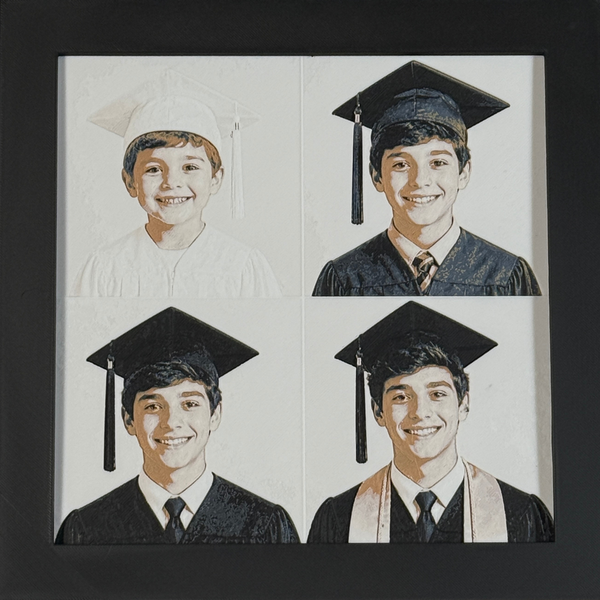
A WTx3D Custom Photo 4-Pack is not one flat sheet with four photographs printed inside boxes.
Each source photograph becomes its own layered-art piece.
The four finished pieces are:
- Prepared individually
- Shown together in one combined proof
- Approved before production
- Individually framed
- Placed inside one larger modular display
- Removable
- Rearrangeable
- Displayable separately
That structure gives every image its own visual space while the larger frame holds the complete achievement story.
The standard Custom Photo 4-Pack uses four uploaded images.
The four files do not need to be different.

A reliable four-image starting framework
Photo 1: the graduate
Begin with the anchor portrait.
Possible choices include:
- Senior portrait
- Cap-and-gown portrait
- Graduate in uniform
- Military graduation portrait
- Graduate holding the diploma or certificate
- Graduate wearing cords, stole, hood, medals, or honors
- Another image that makes the person immediately recognizable
The anchor image should preserve:
- Face
- Eyes and expression
- Cap or headwear when important
- Gown or uniform
- Defining graduation details
- Enough room for crop adjustments
- Useful separation from the background
This photograph answers, “Whose achievement is this?”
Photo 2: the achievement
The second image should show what was completed.
Possible choices include:
- Stage crossing
- Diploma or certificate presentation
- Hooding
- Pinning
- Commissioning
- Oath or service ceremony
- Senior night
- Award
- Academic achievement
- Artistic performance
- Athletic milestone
- Technical-training completion
- Another moment connected to the accomplishment
A ceremony image may contain less facial detail than the anchor portrait. That is acceptable when it contributes the moment the first photograph cannot show.
Photo 3: the people
Graduation rarely happens in isolation.
This position may show:
- Parents
- Grandparents
- Siblings
- Spouse or partner
- Children
- Mentor
- Teacher
- Coach
- Classmates
- Military family
- Another person who supported the graduate
A clear family or relationship image works best when:
- Faces remain large enough
- Subjects are close
- Lighting is reasonably consistent
- Important people are not blocked
- The graduate remains easy to identify
- The group is not overcrowded
When several people deserve individual recognition, separate 4-Pack positions or additional framed pieces may be stronger than one very large group photograph.
Photo 4: school, service, place, or next step
The fourth image gives the achievement context.
Possible choices include:
- Campus
- School building
- Stadium
- Training location
- Hometown
- Classroom, laboratory, shop, studio, or performance space
- School colors
- Approved branch, flag, or service imagery
- Class year
- Degree or program reference
- Letterman jacket or activity symbol
- Future college, career, service, or training destination
- Another meaningful place or design
School logos, seals, mascots, insignia, protected marks, and other restricted imagery require review before they are promised.
An authorized campus or place photograph may provide strong school identity without relying on a protected mark.
Eight practical four-image story structures
Formula 1: portrait, ceremony, family, campus
- Graduate portrait
- Ceremony or diploma moment
- Family
- Campus or school building
Use this when the buyer wants a balanced overview of the milestone rather than a detailed senior-year or college-only narrative.
Formula 2: complete high-school senior year
- Senior portrait
- Cap-and-gown photograph
- Sport, band, theater, club, academics, uniform, instrument, or another activity
- Family, school, or next destination
This works when the gift should preserve the full senior year rather than only the ceremony.
Formula 3: college achievement
- Graduate portrait
- Degree, hooding, or ceremony moment
- Family, mentor, spouse, or another important person
- Campus, department, profession, or next step
Protected department or school marks require review.
Formula 4: military or technical-training completion
- Graduate in uniform
- Graduation or training image
- Family
- Approved branch, flag, school, class, unit, or service-related design
WTx3D must confirm protected insignia, unit marks, school seals, and complex military details before ordering.
Formula 5: past, present, future
- Earlier school or childhood photograph
- Senior or graduation portrait
- Ceremony or family
- Future college, career, service, trade, training, or destination image
This formula shows how the graduate reached the milestone and where the next stage may lead.
Formula 6: graduate, activity, people, next step
- Graduate portrait
- Sport, music, theater, academic subject, technical program, leadership, or other activity
- Family, teacher, coach, mentor, or teammates
- Next college, profession, service, or training path
This keeps the achievement connected to the student’s actual identity rather than reducing senior year to a cap-and-gown photograph.
Formula 7: four stages of the graduate
- Earlier school image
- Middle-school, activity, or developing-interest image
- Senior portrait
- Graduation photograph
This may be especially meaningful to parents and grandparents.
Use photographs the buyer owns or has permission to reproduce.
Formula 8: one portrait in four coordinated treatments
The same graduation photograph may fill all four positions intentionally.
This can work when:
- One portrait is clearly stronger than all other sources
- The buyer wants a four-piece presentation
- Several coordinated treatments create the desired visual effect
- Repetition is a deliberate choice
WTx3D will review which treatments create the strongest physical result.
Exact screen-to-material color matching cannot be guaranteed because screens, room lighting, material batches, and physical layers affect appearance.
The four uploads do not have to be different
Customers may use:
- Four separate photographs
- One photograph four times
- Two photographs repeated
- Three photographs with one repeated
- Four stages of the graduate
- Graduate, ceremony, family, and school
- Graduate, activity, mentor, and next step
- Another intentional four-image arrangement
The important distinction is intention.
Repeated images should support the design rather than appear because the buyer ran out of meaningful photographs.
One strong Large portrait is better than a four-photo display filled with weak or unrelated images.
How to narrow a large graduation gallery
Step 1: sort by role
Create simple groups:
- Graduate
- Achievement
- People
- School, service, place, or next step
This prevents four similar portraits from filling every position before the complete story is considered.
Step 2: identify the anchor portrait
Choose the photograph with the strongest combination of:
- Recognition
- Face size
- Expression
- Cap, gown, uniform, or senior styling
- Useful lighting
- Meaning
The anchor does not need to be the official school photograph.
Step 3: choose the image that proves the achievement
Select the ceremony, diploma, award, hooding, pinning, stage, or completion moment that adds information the portrait cannot.
The graduate may be smaller in this image.
That is acceptable when the anchor portrait preserves the face.
Step 4: identify the important people
Choose the relationship photograph based on who helped define the achievement.
Do not include a large group merely because everyone attended.
Choose the image that tells the clearest relationship story.
Step 5: choose the context or next chapter
Use the fourth position for the school, campus, service, program, activity, place, class year, or future direction that completes the story.
Step 6: use original files
The original phone, camera, scan, or authorized photographer file normally contains more genuine detail than:
- Screenshot
- Social-media download
- Message preview
- Heavily filtered copy
- Repeatedly saved file
- Watermarked preview
Step 7: verify image rights
Professional senior portraits, school photography, event photography, military photographs, and other third-party images may remain protected.
Use only files the customer owns or has permission to reproduce.
Step 8: place all four images side by side
Before uploading, confirm:
- One image clearly anchors the display
- Each other image has a different role
- No file was added twice by mistake
- No weak image is included only to fill a position
- The graduate remains central
- More than four essential images do not require another format
- Protected school or military imagery has been identified for review
Ceremony photographs can contribute without carrying the entire set
A ceremony photograph may be:
- Distant
- Dark
- Brightly lit
- Motion-blurred
- Partly blocked
- Captured from the audience
- A screenshot from a video or livestream
- Focused more on the stage than the face
That image may still carry the actual moment.
Use the close senior or cap-and-gown portrait as the anchor and let the ceremony image serve as the achievement position.
This often creates a stronger and more honest set than asking one distant stage image to preserve both the graduate’s identity and the complete ceremony.
Family, teachers, coaches, and mentors
The “people” position does not need to be a formal family portrait.
It may show:
- Parent and graduate
- Grandparent and graduate
- Siblings
- Spouse or partner
- Children
- Teacher
- Coach
- Mentor
- Military instructor or classmate when appropriate and authorized
- Team or group
- Another important relationship
A teacher or coach gift may also use:
- Group or team photograph
- School colors
- Activity or subject symbol
- Short message or date
WTx3D should not assume every team logo, school mark, or protected symbol can be reproduced.
The people should remain large enough to identify.
When the group is too large, separate portraits or another product structure may be stronger.
School, military, and protected imagery
School colors
School colors may guide:
- Color direction
- Supporting design
- Reviewed frame request
- Four-photo coordination
WTx3D aims for the closest practical match but cannot guarantee exact screen-to-material color matching.
School names and class references
A short school name, class year, degree, or program may be considered when the wording fits the selected product and frame path.
Long official names or complex wording may be better placed on the reverse.
Logos, mascots, seals, and department marks
Some school marks may require permission or may not be suitable for reproduction.
Send the exact reference for review.
WTx3D will confirm whether an appropriate design can be offered or suggest another route.
Military details
A military graduation four-pack may include selected:
- Graduate photograph
- Branch
- Flag
- School
- Class
- Unit
- Rank
- Date
- Service-related symbol
- Family image
The design should focus on the most important details rather than attempting to include every possible service element.
Protected insignia and marks require confirmation.

Different photographs do not need identical backgrounds
A senior portrait, auditorium photograph, family image, and campus photograph may come from completely different sources.
WTx3D prepares each image individually.
Preparation may include:
- Background removal or simplification
- Brightness adjustment
- White and dark-level adjustment
- Contrast
- Sharpness improvement where genuine detail exists
- Crop
- Placement
- Separation around face, cap, gown, uniform, people, or architecture
- Color-direction evaluation
- Manual layered-art preparation
The sources do not need identical lighting or camera settings.
Every photograph still needs enough real information to become a strong individual piece.
Why the complete set is proofed together
Each image receives separate preparation, but the customer receives one combined approval proof.
The proof shows:
- All four images or designed positions
- Crop
- Placement
- Background treatment
- Color direction
- School or service details
- Name or class reference
- Initial arrangement
- Frame path
- Overall coordination
This matters because four individually meaningful images may still need adjustment to work as one display.
Up to two reasonable proof revisions are included.
Reasonable changes may include:
- Minor crop
- Color direction
- Text correction
- Small layout change
- Comparable frame change
A completely different photograph, major composite, protected-design change, or substantially new concept may require separate review.
Nothing enters production until the final proof is approved.
This is not one permanently fixed collage
A printed collage places several photographs onto one flat surface.
The WTx3D Graduation 4-Pack contains four individually framed layered-art pieces inside one larger frame.
The pieces may be:
- Removed
- Reordered
- Displayed separately
- Returned to the larger frame
- Replaced later with compatible pieces, subject to product compatibility
The initial arrangement is not permanent.
A graduate may move the family image to a desk, keep the ceremony and campus together, or rearrange the complete story later.
The larger 4-Pack is designed primarily for wall display.
The individual framed pieces may be displayed separately.
Arrangement order can carry meaning
The four positions may be arranged:
- Chronologically
- By visual balance
- By emotional importance
- Around the anchor portrait
- By school-color direction
- By people, place, and next step
- With the ceremony leading
- With the future destination leading
WTx3D may prepare an initial arrangement.
The customer may request a preferred order before shipment or rearrange the modular pieces later.
Identify any image that must occupy a particular position.
Short wording can support the story
A reviewed four-photo design may include:
- Graduate name
- Class year
- Graduation date
- Degree
- Program
- Rank
- Branch
- Training class
- Short phrase
- School or place reference
- Another concise detail
Front-facing wording should remain short and balanced.
A longer:
- Family dedication
- Prayer
- Advice
- Thank-you
- Story
- Description of the achievement
is normally better placed on the reverse backing.
This keeps the four images visually clear while preserving the complete private message.
Planning around a future photograph
A customer may want the 4-Pack before the final ceremony image exists.
The canon allows for a four-pack to be planned around a future compatible image or keepsake in some cases.
Contact WTx3D before ordering.
Do not assume:
- Every outside print will fit
- Every future photograph can be inserted without new preparation
- A blank position is automatically available
- The customer can order only three images through the standard Custom Photo 4-Pack flow
- A ceremony photograph can be added later without compatibility review
Waiting until all four photographs exist may be the cleaner route.
What the standard Graduation 4-Pack is not
The standard Custom Photo 4-Pack is not:
- One flat printed collage
- Four Large artworks
- An automatic composite of unrelated people
- A guarantee that every school logo or insignia can be used
- Unlimited front-facing text
- A specialty multi-panel wall project
- A promise that every future outside insert will fit
- A guaranteed fixed-date delivery product
- A substitute for rights review on professional photographs
- A promise that more than four essential images can be forced into the standard format
Understanding those limits helps the buyer choose the correct product.

Graduation 4-Pack checklist
Before ordering, confirm:
- Which image is the anchor portrait?
- Which image shows the achievement?
- Which image shows the important people?
- Which image shows school, service, place, or next step?
- Are repeated images intentional?
- Are the original files available?
- Does the customer own or have permission to use every image?
- Are cap, gown, cords, stole, medal, diploma, uniform, or other important details visible?
- Are school or military marks identified for review?
- Is front wording concise?
- Should a longer dedication go on the reverse?
- Is one person approving the combined proof?
- Is the gift a surprise?
- Does the cart show the correct four uploads, product, size, and frame?
- Are more than four essential images forcing the need for another format?
- Is there a fixed presentation date that WTx3D must review?
When the upload, image order, wording, cart, or product does not show the intended graduation story accurately, stop before checkout and contact WTx3D.
Build the achievement story one image at a time
Start with the graduate.
Add the moment that proves the achievement.
Show the people who belong in the story.
Finish with the school, service, place, activity, or next step that gives the milestone context.
The four images do not need to look identical.
They need to be meaningful, clear enough to prepare, and different enough to contribute something of their own.
WTx3D will prepare each accepted source individually, present the complete proof, and wait for approval before fabrication begins.
Create a Four-Photo Graduation Story
For more than four essential images, professional-photo permission, school or military marks, future graduation photographs, separate-photo compositing, custom wording, multi-panel projects, or fixed presentation dates, use the WTx3D contact page before ordering.
Shopping specifically for a daughter? See the Graduation Gift for Your Daughter guide.
Shopping specifically for a son? See the Graduation Gift for Your Son guide.
Also see the High School Graduation Gift, College Graduation Gift, and Military Graduation Gift guides—or the Granddaughter and Grandson guides for grandparent shoppers.
Frequently Asked Questions
What four images should I choose for a Graduation Custom Photo 4-Pack?
A strong starting set is the graduate, the achievement or ceremony, the important people, and the school, service, place, activity, class reference, or next step.
Do all four graduation photographs need to be different?
No. The four uploads may be different or intentionally repeated. One graduation portrait may be used in several coordinated treatments.
Can I use a senior portrait and a ceremony photo together?
Yes. The senior portrait can preserve facial detail while the ceremony image adds the actual achievement moment.
Can one position show family, a teacher, coach, or mentor?
Yes. Use a clear relationship photograph in which the important people remain large enough and are not heavily blocked.
Can one position contain school or military imagery?
A reviewed design may include school, campus, branch, flag, service, class, unit, rank, or another meaningful element. Protected logos, seals, mascots, insignia, and marks require confirmation.
Do the four images need matching backgrounds or lighting?
No. WTx3D prepares each image individually and shows the complete set in one combined proof. Every source still needs enough real information to produce a strong piece.
Can one position show a campus or school building?
An authorized campus or place photograph may work well when the architecture remains recognizable. It may provide school identity without relying on a protected logo.
Can the 4-Pack include a childhood or earlier school photograph?
Yes. A past-present-future structure may include an earlier image, current graduate, ceremony or family, and next destination.
Can text such as a name or class year appear in the set?
Short reviewed wording may be considered. Longer dedications are normally better placed on the reverse backing.
Is the Graduation 4-Pack one flat collage?
No. It contains four individually framed layered-art pieces inside one larger modular display.
Can the four pieces be rearranged?
Yes. The individual pieces are removable, rearrangeable, and displayable separately.
How is the Graduation 4-Pack proofed?
Each image is prepared individually, but the customer receives one combined proof showing all four images, crops, color direction, wording, arrangement, and frame path.
Can I order before the final ceremony photograph exists?
Contact WTx3D first. A future compatible image may sometimes be planned, but every outside print or later insert should not be assumed to fit.
What happens when I have more than four essential photographs?
Contact WTx3D. Several separate pieces or a specialty multi-panel project may be more appropriate than forcing many images into the standard 4-Pack.
Will WTx3D guarantee the set arrives before graduation?
No exact arrival date should be promised without review. Contact WTx3D before ordering when the piece must be presented on a fixed date.
Frequently Asked Questions
How long does a custom piece take?
Most custom orders are proofed within 2-3 business days. Once you approve the proof, production and hand-finishing take about 7-14 business days before your piece ships.
What sizes and frames are available?
Every piece is available in a 4" × 4" or 8" × 8" layered format, and you can choose between our standard black frame or the Signature frame upgrade.
Do I get to see the design before it is made?
Yes. We send a digital proof for every custom order and nothing goes into production until you approve it.
Turn Your Photo Into Framed 3D Layered Art
Upload one photo, approve the proof, and we hand-finish your layered artwork in our West Texas studio.
Shop The Look
Keep Reading
Memorial Art for Horses, Birds, Rabbits, Reptiles, and Other Companions
A companion does not need to be a dog or cat for the relationship to deserve a personal...
Pet Collar Memorial Display: How to Keep the Collar Safely at Home
The original collar should remain with the family. Photograph it, measure it, confirm the current display format, and...

Wedding Photo Gifts for Parents and Grandparents
The strongest parent or grandparent gift uses the wedding photograph that belongs to that relationship—not simply the couple's...